
imageCLASS MF6540/MF6590/MF6595/MF6595CX Basic Operation Guide




11-5
Troubleshooting
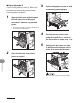
4 Lift and hold the transcription
frame (A), then remove the
jammed paper (only for two-sided
copying).
5 Close the left cover.
Be careful not to get your fingers caught.
6 Pull out the paper cassette and
push the corners of the stack
under the small fins.
7 Gently push the paper cassette
back into the machine until it
clicks.
Be careful not to get your fingers caught.