
imageCLASS MF6500 Series Basic Guide


4-2
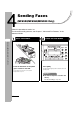
Sending Faxes (MF6550/MF6560/MF6580 Only)
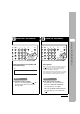
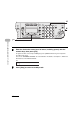
Enter the Fax Number Send the Document
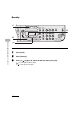
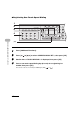
Dial the recipient’s fax number with
the numeric keys.
Press [Start].
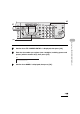
When you set the documents on the platen glass, press
[ ] or [ ] to select the document size, then
press [Start] for each document. When scanning is
complete, press [OK] to start dialing.
If the output paper in the recipient's machine is not equal
to the scanned size, the original image may be reduced
in size or divided into smaller parts before it is sent.
What if...
● You enter a wrong number:
Go back to the wrong digit with [ ]. Or
press [Clear] to delete the entire entry.
Then try again.
What if...
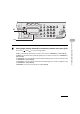
● You want to cancel sending:
Press [Stop] on the operation panel.
When the <STOP KEY PRESSED>
message appears, press [OK].
When the <CANCEL DURING TX/RX?>
message appears, select <YES> with
[].
3
4
d
s
tem
n
itor
View
Settings
e
set Collate
GHI
@./
PQRS
Tone
JKL
ABC
TUV
MNO
DEF
Clear ON/OFF
Stop
Start
Processing/
Data
Error
Power
WXYZ
SYMBOLS
t
ional
c
tions
2 on 1
Frame
Erase
1
4
7
2
5
8
0#
3
C
6
9
Ex.
TEL=012XXXXXXX
d
s
tem
n
itor
View
Settings
e
set Collate
GHI
@./
PQRS
Tone
JKL
ABC
TUV
MNO
DEF
Clear ON/OFF
Stop
Start
Processing/
Data
Error
Power
WXYZ
SYMBOLS
t
ional
c
tions
2 on 1
Frame
Erase
1
4
7
2
5
8
0#
3
C
6
9