
imageCLASS MF6500 Series Basic Guide




13-27
Machine Settings
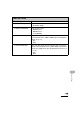
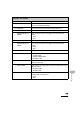
9. SPECIAL MODE R Sets whether to prevent white streaks from appearing on the
printed image. When you print the halftone image or
photograph after the machine has not undergone any
operation for a while, the first page of printouts may have
thin white streaks on the printed image.
–OFF
–ON
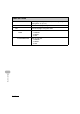
10.SPECIAL MODE S Sets whether to reduce the waiting time for the next printout.
When you change the paper size after continuous printing,
the machine may take a while to start the next printing.
OFF Does not reduce the waiting time next set of printout.
(default)
SPEED PRIORITY Reduces the waiting time to start the next set of printout.
Print speed has priority; however, a condition that an
previously printed image also appears faintly on the next
output may occur.
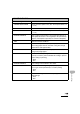
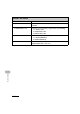
11.CONT. PRINT MODE Sets whether to prevent the back edge of the previous page
from appearing on the following page during continuous
printing of half-tone prints or photographs.
–OFF
–ON
12.BACK EDGE MODE Sets whether to prevent back edge of paper from smudging.
–OFF
–ON
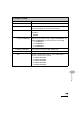
13.LARGE PAPER MODE Sets whether to improve toner fix on large-sized paper.
–OFF
–ON
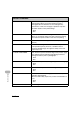
14.AUTO ADF DRTY ADJ Sets whether to activate smudge (due to dust or dirt)
reduction during printing.
When the ADF is dirty, copies may contain unwanted dots or
lines.
–OFF
–ON
15.MAINTENANCE CODE This setting is not functional in this model.
ADJUST./CLEANING