
imageCLASS MF6500 Series Basic Guide


6-3
Copying
Scan Settings
Before pressing [Start] to begin copying, you can adjust the settings to better
suit the document to be scanned. These settings return to the default values if
Auto Clear function is activated or if you press [Reset].
Image Quality
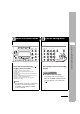
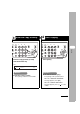
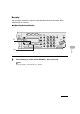
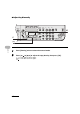
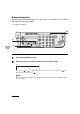
1 Press [COPY].
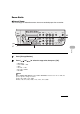
2 Press [Image Quality] repeatedly to select the document type.
<TEXT>: For text documents.
<PHOTO>: For documents that contain fine text or photos.
<TEXT/PHOTO>: For documents that contain text and photos.
NOTE
Copy density automatically changes to manual mode when <TEXT/PHOTO> or <PHOTO> is set.
04
08
2
Address
Book
Paper
Select
COPY FAX SCAN
Image Quality Density Enlarge/Reduce
OK
Two-Sided
System
Monitor
View
Settings
Reset Collate
GHI
@./
PQRS
Tone
JKL
ABC
TUV
MNO
DEF
Clear ON/OFF
Stop
Start
Processing/
Data
Error
Power
WXYZ
SYMBOLS
Additional
Functions
2 on 1
Frame
Erase
ded
al
1
4
7
2
5
8
0#
3
C
6
9
1
2