
imageCLASS MF6500 Series Basic Guide





4-35
Sending Faxes (MF6550/MF6560/MF6580 Only)
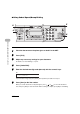
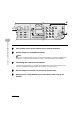
5 Press [Hook] or pick up the handset of your external telephone.
6 Dial the recipient’s fax/telephone number.
NOTE
Make sure to confirm the dial tone before entering a fax number. If you enter the number before
the dial tone can be heard, the call may not connect, or the wrong number may be dialed.
7 Talk through the handset to the recipient.
If you press [Hook] in step 5, you can pick up the handset when you hear the recipient’s voice.
If you hear a high-pitched signal instead of the recipient's voice, go to step 9.
8 Ask the recipient to set their fax machine to receive faxes.
9 When you hear a high-pitched signal, press [Start], then hang up the
handset.
TX
02 03 04
06 07 08
10 11 12
Address
Book
Paper
Select
COPY FAX
Image Quality Density Enlarge/R
OK
Coded
DialRedialHookPause
View
Settings
Collate
GHI
@./
PQRS
Tone
JKL
ABC
TUV
MNO
DEF
Clear ON/OFF
Stop
Start
Processing/
Data
Error
Power
WXYZ
SYMBOLS
2 on 1
ame
Erase
1
4
7
2
5
8
0#
3
C
6
9
5
9
6