
imageCLASS MF6500 Series Basic Guide
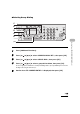




4-33
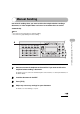
Sending Faxes (MF6550/MF6560/MF6580 Only)
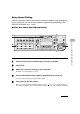
● Using Coded Speed/Group Dialing
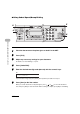
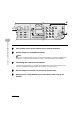
1 Place the document on the platen glass or load it in the ADF.
2 Press [FAX].
3 Adjust any necessary settings for your document.
For details, see “Scan Settings,” on p. 4-3.
4 Press [Coded Dial].
5 Enter the desired two-digit code (00 to 99) with the numeric keys.
If you entered a wrong code, press [Clear], then repeat the procedure from step 3.
6 Press [Start] to dial the number.
When you set the documents on the platen glass, press [ ] or [ ] to select the document
size, then press [Start] for each document. When scanning is complete, press [OK] to start dialing.
03 04
07 08
11 12
Address
Book
Paper
Select
COPY FAX SCAN
Image Quality Density Enlarge/Reduce
OK
Two-Sided
Syste
Moni
Res
Additi
Functi
Coded
DialRedial
View
Settings
Collate
GHI
@./
PQRS
Tone
JKL
ABC
TUV
MNO
DEF
Clear ON/OFF
Stop
Start
Processing/
Data
Error
Power
WXYZ
SYMBOLS
2 on 1
ame
Erase
1
4
7
2
5
8
0#
3
C
6
9
2
4
6
5
TEL=012XXXXXXX
[*01]CANON
Ex.