
imageCLASS MF6500 Series Basic Guide



1-3
Before Using the Machine
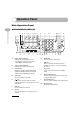
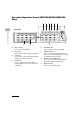
Operation Panel
Main Operation Panel
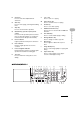
● MF6550/MF6560/MF6580
A Paper Select indicator
Indicates the selected paper source.
* The number of paper sources varies
depending on the model used.
B Jam Location indicator
Indicates the location of paper jams.
C LCD display
Displays messages and prompts during
operation. Displays selection, text, and
numbers when adjusting the settings.
DCOPY key
Press to switch to Copy mode.
E key
Press to decrease the value for various
settings. Also press to see the previous item
in the menu.
FFAX key
Press to switch to Fax mode.
GOK key
Press to determine the contents you set or
register.
H SCAN key
Press to switch to Scan mode.
I key
Press to increase the value for various
settings. Also press to see the next item in
the menu.
J Reset key
Press to return the machine to standby
mode.
K System Monitor key
Press to check fax transmission, print, copy,
or report output status.
L View Settings key
Press to confirm settings of the copy function.
MNumeric keys
Enter letters and numbers.
4
8
2
Address
Book
Paper
Select
COPY FAX SCAN
Image Quality Density Enlarge/Reduce
OK
Two-Sided
System
Monitor
View
Settings
Reset Collate
GHI
@./
PQRS
Tone
JKL
ABC
TUV
MNO
DEF
Clear ON/OFF
Stop
Start
Processing/
Data
Error
Power
WXYZ
SYMBOLS
Additional
Functions
2 on 1
Frame
Erase
ed
l
1
4
7
2
5
8
0#
3
C
6
9
A
d
B D GC E IF H J K L MNQPO
c b a Z WY X V T S RU