
imageCLASS MF6500 Series Basic Guide





13-30
Machine Settings
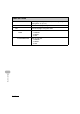
SYSTEM SETTINGS
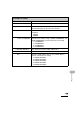
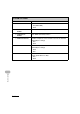
Setting Item Description
1. DEVICE INFO Sets device information.
1. DEVICE NAME Registers the machine name.
2. LOCATION Registers the machine location.
2.
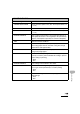
NETWORK SETTINGS
**** Sets network setting. (See Chapter 3, “Network,” in the
Advanced Guide.)
1. TCP/IP SETTINGS Sets TCP/IP network.
1. IP ADDRESS AUTO. Sets whether to automatically set an IP address.
ON Enables an IP address to the machine automatically.
– 1. DHCP (ON/OFF)
– 2. BOOTP (OFF/ON)
– 3. RARP (OFF/ON)
OFF Allocate an IP address to the machine manually.