
imageCLASS MF6500 Series Basic Guide





13-22
Machine Settings
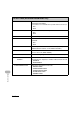
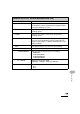
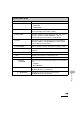
10.PCL SETTINGS*** Sets the PCL printer setting.
1. ORIENTATION Sets the paper orientation.
–PORTRAIT
– LANDSCAPE
2. FONT NUMBER Sets the default font typeface for the printer function using
the corresponding font numbers. (0-120)
3. POINT SIZE Specifies a point size for the default font. This item appears
when the number in <FONT NUMBER> is that of a
proportionally spaced scalable font. (4.00-999.75)
4. PITCH Specifies the pitch for the default font. This item appears
when the number in <FONT NUMBER> is that of a fixed
pitch scalable font. (0.44-99.99)
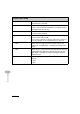
5. FORM LINES Sets the number of lines to be printed on a page. (5-128)
6. SYMBOL SET Selects the symbol set most suited to the needs of the host
computer.
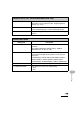
7. CUSTOM PAPER Sets whether to use a custom paper size.
OFF Disables you to specify a custom paper size.
ON Enables you to specify a custom paper size.
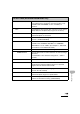
1. UNIT OF
MEASURE
Selects the unit of measurement to specify a custom paper
size.
– INCHES
–MILLIMETERS
2. X DIMENSION Specifies the horizontal size of the custom paper.
(05.00-14.00 inches (127-356 mm))
3. Y DIMENSION Specifies the vertical size of the custom paper.
(03.00-08.50 inches (76-216 mm))
PRINTER SETTINGS