
imageCLASS MF6500 Series Basic Guide





13-7
Machine Settings
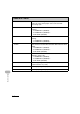
6. AUTO CASS. SELCT Sets whether to change to another paper source of the
same size if the current paper source runs out while
processing a job.
1. COPY Sets whether to activate Auto Cassette Select function when
copying.
– 1. CASSETTE 1 (ON/OFF)
– 2. CASSETTE 2 (ON/OFF)**
– 3. MP TRAY (OFF/ON)
2. PRINTER Sets whether to activate Auto Cassette Select function when
printing.
– 1. CASSETTE 1 (ON/OFF)
– 2. CASSETTE 2 (ON/OFF)**
3. FAX* Sets whether to activate Auto Cassette Select function when
faxing.
– 1. CASSETTE 1 (ON/OFF)
– 2. CASSETTE 2 (ON/OFF)**
– 3. MP TRAY (OFF/ON)
4. OTHER Sets whether to activate Auto Cassette Select function when
printing a report or list.
– 1. CASSETTE 1 (ON/OFF)
– 2. CASSETTE 2 (ON/OFF)**
– 3. MP TRAY (OFF/ON).
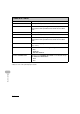
7. SELECT PAPER TYPE Sets the paper type for the paper cassette. (See “For the
Paper Cassette,” on p. 3-8.)
1. CASSETTE 1 Sets the paper type for paper cassette 1.
2. CASSETTE 2** Sets the paper type for paper cassette 2.
COMMON SETTINGS