
imageCLASS MF6540/MF6590/MF6595/MF6595CX Basic Operation Guide




3-3
Copying
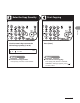
Enter the Copy Quantity Start Copying
Use the numeric keys to enter the
desired copy quantity (1 to 99).
1 0 0 % L T
R
A T E X T
0 1
Press [Start].
You enter a wrong number:
Press [Clear], and enter a new number.
● You want to cancel copying:
Press [Stop] and, when the <CANCEL
COPYING?> message appears, press [ ]
to select <YES>.
●