
imageCLASS MF6500 Series Basic Guide

1-5
Before Using the Machine
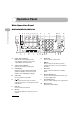
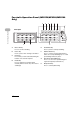
Facsimile Operation Panel (MF6550/MF6560/MF6580
Only)
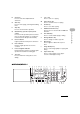
A Direct TX key
Press to set Direct Sending.
B Pause key
Inserts a pause when entering a fax number.
CHook key
Press when you want to dial without lifting the
handset of the external telephone.
D Redial key
Press to redial the last number dialed
manually with the numeric keys when a fax is
standing by.
E Coded Dial key
Press to perform coded speed dialing.
F Address Book key
Press to search preregistered destinations
under one-touch speed dialing keys or coded
speed dialing numbers by name.
G One-Touch Speed Dial keys
Press to use one-touch speed dialing (Pre-
registered frequently used numbers).
H Delayed TX key
Press to set Delayed Sending.
Direct TX
01 02 03 04
05 06 07 08
09 10 11 12
Address
Book
Paper
Select
CO
Image Quality
Coded
DialRedialHookPause
13 14 15 16
17 18 19 20
21 22 23
Delayed
TX
G
A B C D E F
HG
Panel open