
imageCLASS MF6500 Series Basic Guide




13-13
Machine Settings
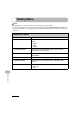
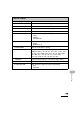
5. TEL LINE TYPE Selects the telephone line type. (See “Set the Machine for
Sending Faxes,” in the Starter Guide.)
– TOUCH TONE
– ROTARY PULSE
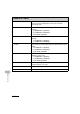
6. VOLUME CONTROL Adjusts the monitor volume and the calling volume.
1. MONITOR VOL.
CTRL
Sets the volume for monitor tone during the fax
transmission. (0-3)
2. CALLING VOLUME Set the volume of the ring produced when the machine
detects a call. (1-3)
7. OFFHOOK ALARM Sets whether the alarm sounds when the handset of the
external telephone is off the hook.
–ON
–OFF
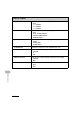
8. STANDARD SETTINGS Sets the default setting for faxing.
1. DENSITY Sets the default density for faxing.
–STANDARD
–DK
–LT
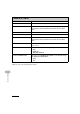
2. IMAGE QUALITY Sets the default image quality for faxing.
–FINE
–PHOTO
– SUPER FINE
– ULTRA FINE
–STANDARD
3. DIRECT TX Sets whether to use <DIRECT TX> as default.
–OFF
–ON
FAX SETTINGS (MF6550/MF6560/MF6580 Only)