
imageCLASS MF6500 Series Basic Guide




13-8
Machine Settings
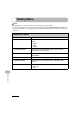
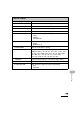
8. REG. PAPER SIZE Sets the paper size for the paper cassette. (See “For the
Paper Cassette,” on p. 3-8.)
1. CASSETTE 1 Sets the paper size for paper cassette 1.
2. CASSETTE 2** Sets the paper size for paper cassette 2.
9. ENERGY IN SLEEP Selects power consumption when the machine is in Sleep
mode between two levels.
– LOW (Only functional for MF6530/MF6531, or when <RX
MODE> is not set to <FaxOnly> for MF6550/MF6560/
MF6580)
–HIGH
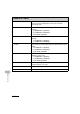
10.MP TRAY STD SET Sets the standard paper size and type for the multi-purpose
tray if you always use a same kind of paper. (See “For the
Multi-Purpose Tray,” on p. 3-11.)
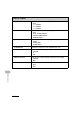
OFF Deactivates the multi-purpose tray standard settings.
ON Activates the multi-purpose tray standard settings.
1. PAPER SIZE Sets paper size as the multi-purpose tray standard.
2. SELECT PAPER
TYPE
Sets paper type as the multi-purpose tray standard.
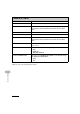
11.PAPER FEED SWITCH Selects the paper feed method when you want to make one-
sided or two-sided prints on preprinted paper (paper which
has logos or patterns already printed on it).
1. MP TRAY Selects the paper feed method for the multi-purpose tray.
SPEED PRIORITY Print speed has priority.
PRINT SIDE The machine starts printing on the side of paper loaded
facing up. Print speed becomes slower for one-sided print.
Only available for LTR, LGL and A4.
COMMON SETTINGS