
imageCLASS MF4270 Basic Operation Guide


1-3
Before Using the Machine
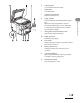
H Scanning area
Scans documents from the ADF.
I Platen glass
Place documents.
J Output tray extension
Extends the output tray.
K Paper stopper
Prevents the paper from falling off the output
tray.
Open the paper stopper from its original
position for LTR/A4 paper. For LGL paper, pull
out the output tray extension first, and then
open the paper stopper.
L Slide guides for multi-purpose tray
Adjust to the width of the paper.
M Paper guide rail
Holds the paper supply.
N Dust cover
Protects the paper supply in the paper cassette
from the dirt and dust.
O Multi-purpose tray
Feeds paper when you insert one by one
manually.
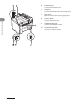
P Scanning platform
Open this platform when replacing the toner
cartridge or clearing paper jams.
Q Main power switch
Turns the power on or off.