
imageCLASS MF4270 Basic Operation Guide



Machine Settings
12-20
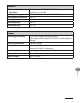
SYSTEM SETTINGS
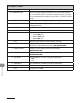
3. ETHERNET DRIVER Specifies the type of network connection.
1. AUTO DETECT Selects the detection method of Ethernet driver.
AUTO Sets the machine to determine the communication mode (Half
duplex/Full duplex) and Ethernet type (10Base-T/100Base-TX)
automatically.
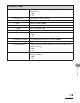
MANUAL Sets the communication mode and Ethernet type manually.
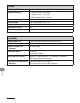
1.
COMMUNICATN
MODE
Selects the communication mode.
FULL DUPLEX
HALF DUPLEX
–
–
2. ETHERNET
TYPE
Selects the Ethernet type.
100 BASE-TX
10 BASE-T
–
–
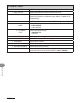
2. MAC ADDRESS Displays the twelve-digit MAC address of your machine.
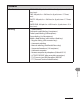
4. VIEW IP ADDRESS Checks the current network settings.
1. IP ADDRESS Checks the IP address.
2. SUBNET MASK Checks the subnet mask.
3. GATEWAY ADDRESS Checks the gateway address.
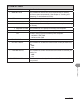
5. STARTUP TIME SET. Sets the time period required to delay the startup of network
communications for the machine (0SEC–300SEC (60SEC)).