
imageCLASS MF4270 Basic Operation Guide



12-19
Machine Settings
SYSTEM SETTINGS
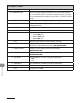
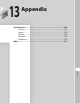
7. USE HTTP Sets whether to activate HTTP (Hyper Text Transfer Protocol) for
the Remote UI.
ON
OFF
–
–
8. PORT NO. SET. Sets the port number settings.
1. LPD 0~65535 (default: 515)
2. RAW 0~65535 (default: 9100)
3. HTTP 0~65535 (default: 80)
4. SNMP 0~65535 (default: 161)
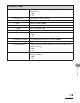
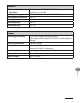
2. SNMP SETTINGS Sets detailed information about SNMP.
1. USE SNMP Sets whether to activate SNMP.
ON
OFF
–
–
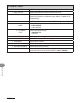
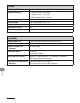
2. COMMUNITY NAME 1 Sets SNMP community name 1 (default: public).
3. COMMUNITY NAME 2 Sets SNMP community name 2.
4. SNMP WRITABLE 1 Enables computers on the network to access the machine and
modify its settings.
ON
OFF
–
–
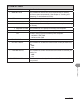
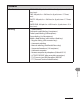
5. SNMP WRITABLE 2 Enables computers on the network to access the machine and
modify its settings.
OFF
ON
–
–