imageCLASS MF4270 Basic Operation Guide
Manuals
Brands
Canon Manuals
Copier
imageCLASS MF4270
211
212
213
214
215
216
217
218
219
220
12-3
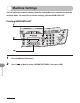
Machine Settings
3
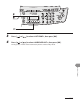
Press [
] or [
] to select <LIST PRINT>, then press [OK].
4
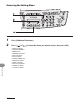
Press [
] or [
] to select <USER DA
T
A LIST>, then press [OK].
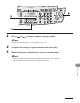
Printing starts, and the screen automatically r
eturns to the standby mode.
1
...
...
214
215
216
217
218
...
...
248