
imageCLASS MF4270 Basic Operation Guide


11-23
Troubleshooting
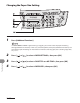
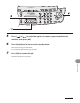
5 Press [ ] or [ ] to select the paper size same as paper loaded into the
machine, then press [OK].
6 Press [Stop/Reset] to return to the standby mode.
Now ready to copy your document.
For a fax job or report printing, go to step 7.
7 Press [OK] to resume the job.
No further operation is required.