
imageCLASS MF4270 Basic Operation Guide


11-17
Troubleshooting
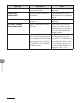
Message Description Action
NOT AVAILABLE You pressed the one-touch
speed dialing key that has
already been registered,
when you are registering
group dialing.
You selected the group
dialing that has already
been registered, when you
are registering a one-touch
speed dialing key.
–
–
Register the one-touch speed
dialing key that is not used.
NOT REGISTERED No recipient is registered for
the one-touch speed dialing
key or coded speed dialing
code you pressed.
Register the recipients before
using the Address Book
function.
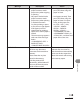
OUT OF TONER
CHANGE TONER
The toner ran out completely. Replace the toner cartridge.
PAPER JAM Paper jams have occurred in
the machine.
<LIFT PANEL TO OPEN/OPEN
TONER COVER> appears
alternately.
Clear the paper jam (See “Paper
Jams,” on p. 11-4.) and reload
paper in the paper cassette or
multipurpose tray. The cover
must be opened and closed to
resume the current job.
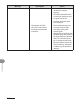
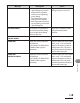
PAPER JAM
OPEN REAR COVER
Paper jams have occurred in
the machine.
<LIFT PANEL TO OPEN/OPEN
TONER COVER> appears
alternately.
Clear the paper jam (See “Paper
Jams,” on p. 11-4.) and reload
paper in the paper cassette or
multipurpose tray. The cover
must be opened and closed to
resume the current job.