
imageCLASS MF4270 Basic Operation Guide


11-15
Troubleshooting
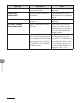
Message Description Action
LOAD PAPER No paper is loaded in the
paper cassette or multi-
purpose tray when copying
or printing.
– Load paper correctly. Then
press [OK] when using the
paper cassette.
–
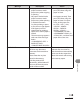
No paper is loaded in the
paper cassette or multi-
purpose tray when printing
a received document.
Or, when printing a report
or list, this massage appears
if the paper size is not
appropriate for printing a
report or list even if paper is
loaded.
This error message appears
with one of the messages
below.
<CHANGE REG’D SIZE/
PAPER SETTINGS>
<CANNOT PRINT RX DATA>
– Load paper correctly. Then
press [OK] when using the
paper cassette. For report
or list, set the paper size
to <LTR>, <LGL>, <A4>,
<OFICIO>, <BRAZIL-
OFICIO>, <MEXICO-
OFICIO>, <FOLIO>,
<GOVERNMENT-LETTER>,
<GOVERNMENT-LEGAL>, or
<FOOLSCAP>, and then load
paper of the same size.
–
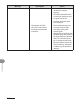
LOST IMAGE The machine was turned
off when any documents
were stored in the machines
memory.
Please note that any data
stored in the memory,
including received fax
documents, will be deleted if
you turn off the main power
switch of the machine.
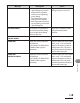
The error is automatically
released after two seconds,
and the machine automatically
prints out the lost report that
shows the records still existing
in the activity report.