
imageCLASS MF4270 Basic Operation Guide


Troubleshooting
11-14
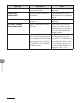
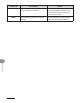
Message Description Action
CHECK DOCUMENT A document jam may have
occurred in the ADF.
Remove the jammed
document.
CLOSE COVER
TONER COVER
The toner cover is not closed
completely.
Check the toner cover, and
make sure that it is completely
closed.
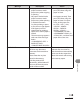
HANG UP PHONE The external telephone is off
the hook.
Hang up the external
telephone.
LIFT PANEL TO OPEN
OPEN TONER COVER
Appears alternately with other
messages.
Varies by the message that
appears. For details, see the
explanation for the message
(i.e., <SET PAPER AGAIN/SET
TONER AGAIN>).
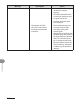
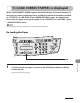
LOAD CORRECT PAPER The size of the paper in the
paper cassette or multipurpose
tray is different from that of the
paper specified in <CASSETTE>
or <MP TRAY> of the <PAPER
SETTINGS> menu.
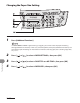
Load the correct size paper
or change the paper size in
<CASSETTE> or <MP TRAY> of
the <PAPER SETTINGS> menu.
For more information, see “If
<LOAD CORRECT PAPER> is
displayed,” on p. 11-21.