imageCLASS MF4270 Basic Operation Guide
Manuals
Brands
Canon Manuals
Copier
imageCLASS MF4270
141
142
143
144
145
146
147
148
149
150
Printing
6-8
4
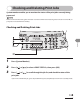
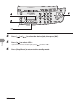
Press [
] or [
] to select the desired job
, then press [
OK].
5
Press [
] to selec
t <YES>.
If you do not want to cancel the job
, press [
] to select <NO>.
6
Press [St
op/Reset] to return to the standb
y mode.
1
...
...
143
144
145
146
147
...
...
248