
imageCLASS MF4270 Basic Operation Guide



Receiving Documents
5-2
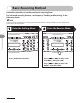
Basic Receiving Method
Follow this procedure to set the machine for receiving faxes.
For advanced receiving features, see Chapter 4, “Sending and Receiving,” in the
Reference Guide.
Any data stored in the memory, including received fax documents, will be deleted if you turn off the main
power switch of the machine.
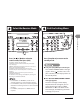
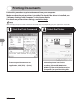
Enter the Setting Menu Enter the Receive Mode
Press [Additional Functions].
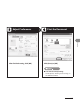
Press [ ] or [ ] to select <FAX
SETTINGS>, then press [OK].
Press [ ] or [ ] to select <RX
MODE>, then press [OK].