
imageCLASS MF4270 Basic Operation Guide


4-31
Sending Faxes
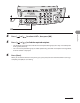
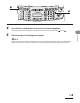
4 Press [ ] or [ ] to select <SEARCH>, then press [OK].
5 Use the numeric keys to enter up to 10 first characters of the recipient’s name,
then press [OK].
S E A R C H [ A ]
C A N O N
Ex.
Enter uppercase letters for a recipient registered in uppercase letters and enter lowercase letters for a
recipient registered in lowercase letters.
When the search is complete, the number of recipients that match the characters you entered is
displayed in parentheses.
Press [Clear] to run a new search.
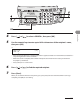
6 Press [ ] or [ ] to find the required recipient.
7 Press [Start].
When you set the documents on the platen glass, press [Start] for each document. When scanning is
complete, press [OK] to start dialing.
–
–
–