imageCLASS MF3200 Series Basic Guide
Manuals
Brands
Canon Manuals
Copier
imageCLASS MF3240
91
92
93
94
95
96
97
98
99
100
6-5
Copying
●
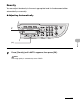
Adjusting Manually
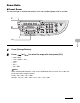
1
Press [Density] until the man
ual mode appear
s.
2
Press [
] or [
] to adjust the cop
y density
, then press [OK].
[
]: to make light documents darker
[
]: to make
dark documents light
er
2
1
[OK]
Ex.
DENSITY
-LT DK+
1
...
...
95
96
97
98
99
...
...
161