
imageCLASS MF3111 Basic Guide



Main Components of the Machine
1-3
Introduction
1
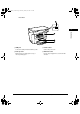
Rear View
a USB port
Connect the USB (Universal Serial Bus) cable.
b Face up cover
Open it when you output paper face up, or
remove jammed paper.
c Power socket
Connect the power cord.
d Extension cover
Protects paper supply in the cassette from dirt
and dust.
LD_Basic_US.book Page 3 Monday, January 10, 2005 1:27 PM