
imageCLASS MF3111 Basic Guide




Menu Descriptions
10-4
Machine Settings
10
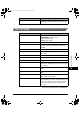
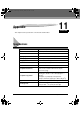
PRINTER SETTINGS
(The factory default setting is in bold face.)
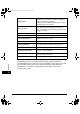
TIMER SETTINGS
(The factory default setting is in bold face.)
Name Descriptions
1. ERROR TIME OUT Sets the length of time before the machine returns
an error when no data is received from the
computer.
ON The error time out is on. Sets the time out period.
5SEC to 300SEC (15SEC)
OFF The error time out is off.
Name Descriptions
1. AUTO CLEAR Sets the auto clear function. If the machine
remains idle for a set amount of time, the display
returns to the standby mode.
ON Sets the time until the machine returns to the
standby mode.
1MIN. to 9MIN. (1MIN.)
OFF The auto clear function is turned off.
2. ENERGY SAVER Sets the energy saver mode.
ON Sets the time until the machine enters the energy
saver mode.
3MIN. to 30MIN. (5MIN.)
OFF The auto energy saver function is turned off.
LD_Basic_US.book Page 4 Monday, January 10, 2005 1:27 PM