
imageCLASS MF3111 Basic Guide




Menu Descriptions
10-3
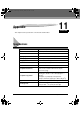
Machine Settings
10
(The factory default setting is in bold face.)
COPY SETTINGS
(The factory default setting is in bold face.)
3. DISPLAY LANGUAGE Shows the language displayed in the LCD.
ENGLISH, FRENCH, SPANISH, PORTUGUESE
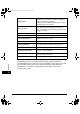
Name Descriptions
1. STD. IMAGEQUALITY Selects the document type.
TEXT/PHOTO: Text/photo mode
TEXT: Character mode
PHOTO: Photo mode
2. STANDARD EXPOSURE Sets how the exposure is adjusted.
MANUAL Adjusts the exposure manually.
The exposure can be adjusted in 9 increments.
(center)
AUTO The exposure is adjusted automatically.
3. STANDARD COPY QTY Selects the copy quantity.
1 to 99 (1)
4. AUTO SORT Sets the auto sort function.
OFF The auto sort function is turned off.
ON The auto sort function is turned on.
5. PAPER SIZE GROUP The paper size group can be selected. If the paper
size group is changed, the preset copy ratios will
also change.
INCH Preset copy ratios: 50%, 64%, 78%, 100%, 129%,
200%
A Preset copy ratios: 50%, 70%, 100%, 141%,
200%
AB Preset copy ratios: 50%, 70%, 81%, 86%, 100%,
115%, 122%, 141%, 200%
6. SHARPNESS The sharpness setting of an image can be
adjusted. When you want to make characters and
lines clear, select a larger value. When you make
copies of photographs, select a smaller value.
1 to 9 (5)
Name Descriptions
LD_Basic_US.book Page 3 Monday, January 10, 2005 1:27 PM