
imageCLASS D880/D860/D861 Basic Guide



4-9
Making Copies
4
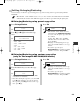
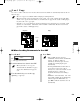
2 on 1 Copy
Use 2 on 1 to reduce 2 sheets to fit on one sheet. Two letter-size documents are automatically reduced to fit on a
letter-size page.
• The 2 on 1 copy is not available with an enlarging or reducing function.
• When no letter-size paper is loaded in the cassette, LOAD LTR SIZE PAPER appears in the LCD
and the 2 on 1 copy is canceled. In this case, load the letter size paper in the cassette or multi-purpose
tray and set the 2 on 1 copy again.
• To make a 2 on 1 copy reducing two A4-size documents to fit on an A4-size page, set PAPER SIZE
GROUP to A or AB in COPY SETTINGS of ADDITIONAL FUNCTIONS. Be sure to load A4-size
paper in the cassette or multi-purpose tray.
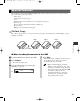
■ When Loading Documents in the ADF
2
1
1
2
Originals Copy
2 on 1
NOTE
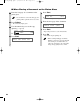
1
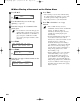
Press 2 on 1.
Ex:
• 2ON1 appears in the LCD.
2
Load documents face down in the ADF.
• When you make a 2 on 1 copy of a
document with an odd number of pages,
add one more blank letter size paper to
scan.
3
Use the numeric keys to set the copy
quantity. (→ p. 4-3)
4
Press Start.
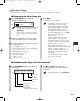
• If the available memory decreases,
SCANNING, PLEASE WAIT and MAKING
SPACE IN MEM are displayed
alternatively. If memory space becomes
available, the scanning begins again
automatically.
• For imageCLASS D880, check if there are
received faxes or faxes to be sent in
memory. If so, wait for the machine to send
and print any faxes, or delete any
documents in memory before making a
copy.
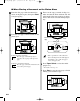
•IfMEMORY FULL and PRESS SET KEY
appear while scanning, the document being
scanned stops in the ADF. In this case,
press Set to make the document come out
automatically.
NOTE
NOTE
2ON1 LTR
TEXT
01
04 RG_Chap4.qxd 6/17/04 2:21 PM Page 4-9