
imageCLASS D1180/D1170/D1150/D1120 Basic Operation Guide


12-13
Troubleshooting
Clearing Jams
5
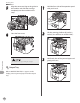
Close the duplex print transport guide.
6
Hold the paper cassette with both hands
and set it back into the machine.
Be careful not to get your fingers caught.
7
Open and close the front cover to reset
the machine.
If you are using the multi-purpose tray, close it
before opening the front cover. To open the
front cover, push the open button (A).
Be careful not to get your fingers caught.