
User Manual


!
EN
21
11. TROUBLESHOOTING AND WARRANTY
If you believe the washing machine is not working correctly, consult the quick guide
provided below which includes some practical tips on how to fix the most common
problems.
ERROR CODE FORMAT
Error shown
Possible causes and practical solutions
E2 (on App)
The machine cannot load water.
Make sure the water supply tap is open.
Make sure the water supply hose isn’t bent, kinked or trapped.
Make sure the drain pipe is at the proper height (see installation section).
Close the water supply tap, unscrew the filler hose from the back of
the washing machine and make sure the “anti-sand” filter is clean
and not blocked.
Check that the filter is not clogged or that there are no foreign bodies
inside the filter compartment that can obstruct the proper flow of water.
E3 (on App)
The washing machine does not drain water.
Check that the filter is not clogged or that there are no foreign bodies
inside the filter compartment that can obstruct the proper flow of water.
Make sure the drain hose isn’t bent, kinked or trapped.
Make sure the home drainage system is not blocked and is allowing
water to flow through without obstruction. Try to drain the water in the sink.
E4 (on App)
There is too much foam and/or water.
Ensure the correct amount of detergent is being used and the
detergent is designed for use in a washing machine.
E7 (on App)
Door problem.
Make sure the door is correctly closed.
Make sure the clothes inside the drum are not preventing the door
from closing fully.
If the door is locked, turn off and unplug the washing machine from
the electrical supply socket, wait 2-3 minutes and reopen the door.
Any other code (on
App)
Turn off and unplug the washing machine, wait a minute. Turn on the
machine and restart a program. If the error occurs again contact an
Authorised Customer Service Centre directly.
Errors will be highlighted directly on the appliance via alternating flashing patterns of
blue and green LED lights.
0.5s blue – 0.5s green flashing
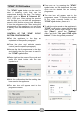
If the appliance has been correctly paired and is therefore connected to the App and to
the Internet, a pop-up on the smartphone’s display screen will show the error code.
You will be able to view its meaning and possible solutions to the issue. In all cases,
the errors and the proposed solutions are included in the table below.
Before contacting customer services, carry out the listed checks.