
User Manual

!
EN
19
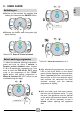
! When prompted by the App, enter the
credentials of the home Wi-Fi network
(name and password).
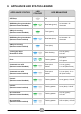
! If the procedure is successful, the LED
will turn blue and flash slowly. The door
lock and Remote control will activate. If
you have problems, repeat the procedure
on the App.
! Make sure that the router is on and
connected to the Internet.
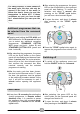
! Load the laundry, close the door, add the
detergent if necessary.
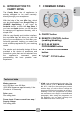
! Switch on the appliance by pressing the
ON/OFF button for 4 seconds (then
release). The LED will turn green and
start flashing slowly.
! Press and hold the REMOTE CONTROL
button for 1 second until you hear a short
acoustic signal. The LED will turn blue
and start flashing slowly, the door lock
and Remote control will activate.
! Open the App and start the cycle.
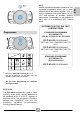
! At the end, switch off the appliance by
pressing and holding the ON/OFF button
for 3 seconds. The door will unlock after
about 1 minute.
! To exit Remote control mode during a
cycle, press the REMOTE CONTROL
button for 1 second. The LED will turn
green and the appliance’s command
panel will become operational again. If
the cycle has been paused, you will be
able to open the door after about 1
minute.
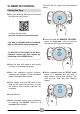
! With the door closed, press the REMOTE
CONTROL button for 1 second and you
will be able to control the appliance
through the App again. If there is a cycle
underway, it will continue.
The frequency of your home Wi-Fi
network must be in the 2.4 GHz band.
The machine cannot be configured if
the home network is set on the 5 GHz
band.
Enabling Remote control
Disabling Remote control
For safety reasons, in some phases
of the wash cycle, the door can only
be opened if the level of the water is
below the door’s lower rim and the
temperature is below 45°C. If these
conditions are met, you have to wait
for 1 minute before you can open the
door.