
User Manual

!
18
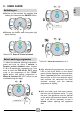
10. REMOTE CONTROL
! Scan the following QR code to download
the App onto your device:
or follow the link below:
go.haier-europe.com/download-app
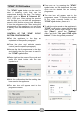
! Open the App and create a user profile
(or login if you already have one).
! Start the appliance pairing process,
selecting the category of the purchased
product (washer/washer-dryer).
! When asked, scan the QR code on the
label on the inner side the door, or enter
the product serial number manually (16
numbers).
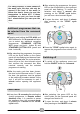
! Close the door.
! When prompted, switch on the appliance
by pressing the ON/OFF button for 4
seconds (then release).
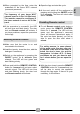
The LED will turn green and start flashing
slowly.
4s
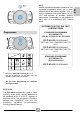
! Press and hold the REMOTE CONTROL
button for 4 seconds, until you hear the
second acoustic signal (and release).
4s
4s
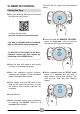
! Within 1 minute, press the "STAR" cycle
button for 1 second, until you hear a
short acoustic signal (and release). The
LED will turn blue and start flashing
rapidly.
1s
Pairing the App
The App is available both for Android
and for iOS tablets and smartphones.
To discover all the details of the Wi-Fi
features, explore the App menus by
switching on the DEMO mode.