
User Manual

!
EN
15
9. USER GUIDE
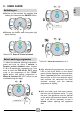
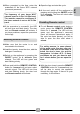
! Switch on the machine by pressing and
holding for 4 seconds the ON/OFF button.
4s
! Release the button when the green light
starts flashing.
Green LED: Remote control disabled
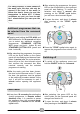
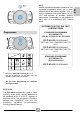
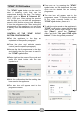
To select the desired washing programme,
press and hold, for about 1 second, in
Remote control disabled mode, buttons
C, D or E respectively, depending on if you
want to start the ECO 40-60, 20°C wash
cycle or the programme of the "STAR"
cycle button (the default programme is
Mixed & Coloured 59' 20°C, which can be
modified though the App).
X1
1s
ECO 40-60
C
X1
1s
20°C
D
X1
1s
E
* DEFAULT: Mixed & Coloured 59', 20°C.
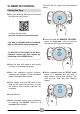
! After selecting the programme, the green
LED on the on/off button on the control
panel will stop flashing and become fixed.
About 1 second after the cycle selection,
there will be a first, short acoustic signal
that confirms the command has been
received correctly and the selected
programme is starting.
! After the wash cycle has been chosen,
the door lock will become active. To open
the door, the appliance must be paused
or the switch-off procedure started. At the
end, it will still be necessary to wait 1
minute before opening the appliance
door.
Switching on
Select washing programme