
User Manual

!
EN
13
6. INTRODUCTION TO
CANDY NOVA
The Candy Nova line of appliances is
entirely designed to be used remotely,
directly through your smartphone.
With the help of the new hOn App, which
can be downloaded from Google Play (or
HUAWEI AppGallery) if you have an
Android device, or from the App Store if
you have an Apple device, you will be able
to manage your appliance remotely, with a
simple click.
With its user-friendly and intuitive interface,
the new hOn App will allow you, with the
help of your smartphone, to look after your
favourite garments, helping you select the
most suitable programme for your washing
needs.
The simple and minimalist design of Nova
provides a fair choice of operations and
normative cycles that can be selected from
the appliance’s command panel,
guaranteeing the best possible user
experience.
Water pressure:
min 0.05 Mpa / max 0.8 Mpa
(0.05 MPa dispenses approximately 1 litre
of water in 10 seconds)
Spin r.p.m.:
See rating plate.
Power input / Power current fuse amp /
Supply voltage:
See rating plate.
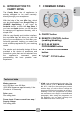
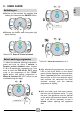
7. COMMAND PANEL
A
D
C
E
B
A
ON/OFF button
B
REMOTE CONTROL button
(enabling/disabling)
C
ECO 40-60 WASH
PROGRAMME button
D
20°C WASH PROGRAMME
button
E
"
STAR"
*
CYCLE button
*
STAR cycle reconfigurable from the App. The
factory default cycle is Mixed & Coloured
59', 20°C, 1000 rpm. After pairing the product
with the App, you will be able to change the
programme saved in this position at any time,
selecting it from the programme list (follow
the instructions in the App or in the dedicated
paragraph). After saving the programme on
the appliance, you can start it directly from
the dashboard, like a normal cycle.
Technical data