
User manual



16
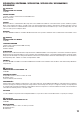
MIRRORED DISPLAY
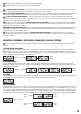
With this function, letters, numbers and symbols can be displayed horizontally or vertically or mirrored horizontally or vertically on the LED matrix
panel. Press the MODE button repeatedly until “Inve” appears on the display and confirm by pressing ENTER. Using the UP and DOWN buttons, select
the desired option and confirm with ENTER.
UP/DOWN-> ENTER->
-> ENTER
<- MODE
Mirroring
disabled
horizontal
Mirroring
vertical
Mirroring
horizontal and
vertical mirroring
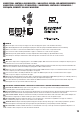
SYSTEM SETTINGS AND SYSTEM INFORMATION
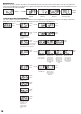
To be able to adjust or read system settings and information, press the MODE button repeatedly until “Sett” appears on the display. Confirm with
ENTER. Now you can select and modify one of the following menu items using the UP and DOWN buttons:
-> ENTER ->
<- MODE
UP/DOWN
-> ENTER
<- MODE
-> ENTER ->
<- MODE
UP/DOWN
Display is rotated
by 180°
(overhead mounting)
-> ENTER
<- MODE
-> ENTER ->
<- MODE
UP/DOWN
on = display always on
off = display goes off
after about 60 seconds of
inactivity
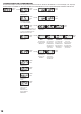
-> ENTER ->
<- MODE
UP/DOWN
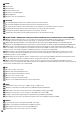
Using this menu item, you can define which
mode is to be activated, should the DMX
input signal be lost in the DMX mode.
-> ENTER
<- MODE
last DMX command
is held
Blackout Music control
-> ENTER ->
<- MODE
UP/DOWN
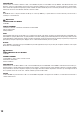
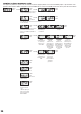
Setting the
Dimmer curve
Dimmer curve
linear
The light intensity
increases linearly
with the DMX value.
Dimmer curve
exponential
Adjustment of the
light intensity is
finer in the lower
DMX value range
and coarser in the
upper DMX value
range.
Dimmer curve
logarithmic
Adjustment of the
light intensity is
coarser in the lower
DMX value range
and finer in the
upper DMX value
range.
-> ENTER
<- MODE
S-curve
Adjustment of the
light intensity is fine
in the lower and
upper DMX value
ranges and coarse
in the middle DMX
value range.
-> ENTER
<- MODE
-> ENTER ->
<- MODE
UP/DOWN
Dimmer response The light reacts
abruptly to changes
in the DMX value.
The light behaves
in a manner
similar to that of a
halogen lamp with
gentle changes in
brightness.
-> ENTER ->
<- MODE
displays the
firmware version
-> ENTER ->
<- MODE
Displays the device
temperature in °C
-> ENTER ->
<- MODE
Displays the operat-
ing time in hours
-> ENTER ->
<- MODE
LED Test
Functional test of all
LEDs from 1 to 25.
Display flashes
during test. Press
MODE or ENTER
to exit.