
User Manual



900S Series Industrial Grade CFast Product Manual v2.0Cactus Technologies
®
27
S.M.A.R.T. Read Log
6.8.
This command returns the data of the SMART log. When issuing this command, set the Sector Count
register to the number of sectors to read and set the Sector Number register to the Log address.
The Log addresses are dened as follows:
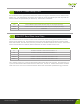
Address Description
0x00 Log directory
0x10 NCQ Command error log
0x80-0x9F Host Vendor Specic logs
0xA0 SMART Wear Level data
0xA1 SMART Remap data
0xA2 Reserved
0xA3 Reserved
The Log directory (address 0) returns 1 sector of data that shows the number of sectors for the
dened Log addresses:
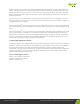
Byte Value Description
0-1 1 SMART logging version
2-19 0 Reserved
20-21 1 Number of sectors for SMART Log at address 0x10
22-255 0 Reserved
256-319 16 Number of sectors for SMART Log at addresses 0x80-0x9F
320-321 4 Number of sectors for SMART Log at address 0xA0
322-323 1 Number of sectors for SMART Log at address 0xA1
324-325 1 Number of sectors for SMART Log at address 0xA2
326-327 1 Number of sectors for SMART Log at address 0xA3
328-511 0 Reserved
The NCQ Command Error Log returns information about the most recent NCQ command failure.
The Host Vendor Specic Logs can be used by the host to store and retrieve arbitrary data. The
SMART Wear Level Data and SMART Remap Data logs return the same data that is also returned by
the SMART A2 Read Wear Level Data and SMART A2 Read Remap Data commands.
S.M.A.R.T. Write Log
6.9.
This command writes data of the SMART log. When issuing this command, set the Sector Count
register to the number of sectors to write and set the Sector Number register to the Log address.
Only the Host Vendor Specic logs can be written, all other logs are read only.