
User`s manual


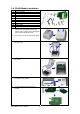




13. Put the Fixture Plate first then the Washer
and tighten the Nut to mount Antenna
Connection Wire on the printer.
【
Note
】
It is suggested to tighten the Nut with
long-nose pliers when mounting the Antenna
Connection Wire.
14. Turn the Antenna according to the
direction as arrow showed to mount it on
the Antenna Connection Wire. The angle
of Antenna can be adjusted if needed.
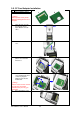
15. To complete the installation, reassemble
the middle compartment and tighten the
screws onto the bottom of the printer,
then put the top cover back.
【
Note1
】
After the WLAN module installation is
completed, please send the
"^XSET,USBETHERNET,1" printer command
to printer for activating the Ethernet
connection function. Please mind that USB
port will be deactivated once the Ethernet
connection function is activated.
【
Note2
】
The first time setting operation must be
performed with Ethernet (wired) connection
before you can access wireless network.
EZ-1000Plus User’s Manual
27