
User`s manual






3-4. WLAN Module Installation
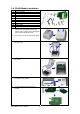
1 Ethernet Cable 1.8M
2 Secure Screw*1
3 Bracket Screw*2
4 Module Bracket
5 WLAN module
6 Module Connection Wire
7 WLAN Antenna
8 Nut (for Antenna)
9 Washer (for Antenna)
10 Fixture Plate
11 Antenna Bracket
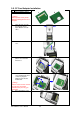
1. Make sure the power is off and the
power cable is unplugged. Place the
printer onto a smooth surface and flip the
whole printer unit upside down.
2. Unscrew the screws as indicated in figure.
3. Press the Cover Open Button and open
the top cover.
1
1
2
2
4. Remove the middle compartment and the
top cover.
5. Remove the Ethernet port cover from
back plate of the printer.
6. Secure the WLAN module onto the
bracket.
EZ-1000Plus User’s Manual
25