
User`s manual


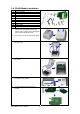




7. Cut the cable tie on the Module
Connection Wire. Then Plug the
connector into the socket on Ethernet
module.
【
Note
】
Please cut the cable tie carefully. Do not
damage the Module Connection Wire.
8. Align the Ethernet module to the Ethernet
port and plug into it.
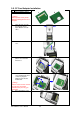
9. Thread the Module Connection Wire
through the other connection wires on the
mainboard as the direction showed in
figure.
【
Note
】
Please organize all cables and wires well
before putting middle compartment and top
cover back to ensure that the printer can be
assembled correctly.
10. Secure the module onto the back plate.
11. To complete installation, put the middle
compartment back and tighten it onto the
bottom of the printer, then put the top
cover back.
【
Note
】
After the Ethernet module installation is
completed, please send the
"^XSET,USBETHERNET,1" printer command
to printer for activating the Ethernet
connection function. Please mind that USB
port will be deactivated once the Ethernet
connection function is activated.
EZ-1000Plus User’s Manual
24