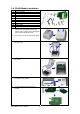
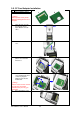
10. Follow the direction as
shown in figure to feed
the liner across the
stripper.
11. Close the upper print
mechanism and the
stripper.
12. Press the FEED key to
adjust the position of
label and complete the
installation.
EZ-1000Plus User’s Manual
20