
User Guide



Copyright © 2000 Buzz Tools
®
, Inc. 3 | Multiple-Section Designs -
61
When you open a multiple-file design that uses a BuzzEdit
™
manager file, you should choose the manager file name from the
BuzzEdit
™
Open Design dialog box. This causes all of the
associated design files to be opened and ensures that they are
positioned correctly.
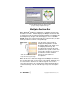
This twelve-part Giant Hoop-it-All
™
design is opened
easily by choosing the BuzzEdit
™
manager file.
If you have a multiple-file design (or a multiple-hoop design that
uses multiple-files) created by a program other than BuzzEdit
™
, you
can read the design into BuzzEdit
™
by checking the Multiple-file
Design checkbox in the Open Design dialog box.
Check the Multiple-File Design checkbox to let
BuzzEdit
™
know this is a Multiple-File design.
This action brings up the Open Multiple-File Design dialog box that
allows you to specify a series of files to open and which hoop to use.
This procedure is described on page 82. Many PES (version 2.5 or
greater) multi-hoop designs can be opened directly and do not
require any special procedure.