
Specifications
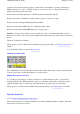
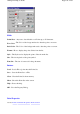
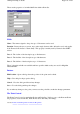


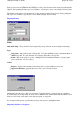

These are the properties of an individual Point within a Point Set.
Fields
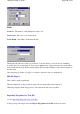
Name
-
The name assigned to the point, up to 35 characters can be used.
Rotation
- Rotates the text on screen, any rotation angle between -90 to 90 can be used, only applies
if the Format for Point Set is "Name Only". This property is mainly used by Names in the OziMC
add
-on.
Desc 1
-
The 1st line of the description, up to 20 characters.
Desc 2
-
The 2nd line of the description, up to 20 characters.
Desc 3
- The 3rd line of the description, up to 12 characters.
These 3 description fields are available and have specific widths as they are used for Magellan
Datasend POI's.
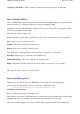
Buttons
Edit Position
- Opens a dialog where the position of the point can be edited.
Help
-
Gives help for the properties dialog.
Cancel
-
Close the dialog and discard any changes.
Save
- Close the dialog and keep the changes.
If you make any changes to the point you must save the point file to make the changes permanent.
The Point Control
The Point Control is used to manipulate Points and Point Sets. It allows you to edit Point and Point
Set properties, create new Points, make Points active and many other things.
see also
Points
Point Properties
Point Set Properties
Page
193
of
252
OziExplorer Help Contents