
Specifications



Loading Routes from File
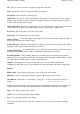
This is still causing me problems on how to code this properly.
At the moment you should make sure you load the waypoint file which you were using when you
created the route. It is not possible to display a route unless the waypoints are loaded as well.
It is possible for the waypoint stored in the route not to agree with the waypoints loaded on the map
if the waypoints have been modified since the route was created. This is corrected by pressing the
ReLink
button on the Route editor.
Upload/Download
All the Routes can be uploaded to the GPS or downloaded from the GPS using options on the
Lowrance, Garmin, Magellan and MLR menus.
Single Routes can also be uploaded and downloaded using the buttons on the Route Editor.
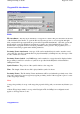
Route Editor
Lists
Upper List
-
The number of Routes available. This number depends on how many routes are
available in your GPS and how many you specified in the GPS parameters in configuration.
Lower List
-
A list of the waypoints in the Route selected in the upper list. The list scrolls to the
right to see all the columns. To see the list in full press the Show button to the right of the list.
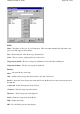
Buttons
Add Wp
-
Depressing this button the allows you to click on top of waypoints on the map and they
are automatically added to the end of the selected Route.
Properties
-
Opens the selected
Route properties
.
Page
167
of
252
OziExplorer Help Contents