
Specifications




the date used is the PC date. This is necessary as not all NMEA sentences provide the date. Note that
the time initially used to log track points may be the PC time until a time has been collected from the
NMEA sentence.
Proximity Waypoints
Proximity zones can be set around waypoints at any specified distance in the units you have
specified in the configuration.
If you travel into (enter) this zone while using Moving Map an alarm will sound.
Proximity zones are used to indicate when you are approaching a waypoint and also have a good
visual presence so can be used to highlight a waypoint.
Note 1 : Proximities can be used for any waypoint not just those in routes.
Note 2 : Do not confuse waypoint proximities with the
Route Waypoint Proximity
, they are
separate parameters. The route waypoint proximity is used to indicate when the leg of a route has
been completed and the number applies to all waypoints in the route.
The proximity zones show as red circles with a blue diagonal hatch.
Note : While the proximity waypoints are similar to those found in Garmin GPS receivers it is not
possible at this stage to upload these to the Garmin.
Creating Proximity Waypoints
Any waypoint can have a proximity zone set. Go into the properties for a waypoint, on the properties
there is a field called
Proximity Distance
, enter a number into this field.
Anchor Alarm
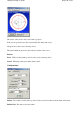
The Anchor Alarm will check how far your vessel has drifted from its anchor point and sound an
alarm when the value exceeds the specified radius.
Screen
Page
149
of
252
OziExplorer Help Contents