
Printer User's Guide


131_136.htm
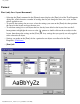
Click this button to select the next field.
Click this button to select the previous field.
Click this button to close the Define Fields dialog box and save any changes.
Click this button to display the Add a Field dialog box, which allows you to create new fields for the
current database.
Click this button to delete the field selected in the "Fields:" list box.
Click this button to display the Edit a Field dialog box, which allows you to edit the name and format of
the field selected in the "Fields:" list box.
BACK NEXT
file:///E|/insiders/131_136.htm (2 of 2) [9/26/2007 1:55:26 PM]