All in One Printer User Manual
Manuals
Brands
Brother Manuals
All in One Printer
Printer DCP-J140W
41
42
43
44
45
46
47
48
49
50
38
i
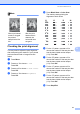
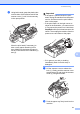
While holdi
ng
the paper tray in place,
pull out the pape
r
support (1
)
until it
clicks, and then unfold the paper
support
flap (2)
.
Impo
rtan
t
DO NOT use the paper support
flap for
Legal s
ize pape
r
.
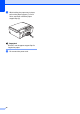
j
Re-connect
the power cor
d.
1
2
2
1
...
...
46
47
48
49
50
...
...
76