
Multi-Protocol Print Server Network User's Guide
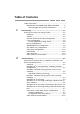
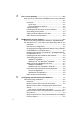
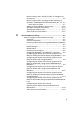
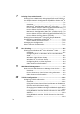
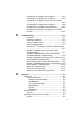


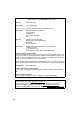
Table Of Contents
- Table of Contents
- 1 Unix Printing 1-1
- 2 TCP/IP Printing 2-1
- 3 Peer to Peer Printing 3-1
- 4 NetBIOS Peer to Peer Printing 4-1
- 5 Configuring Internet Printing for Windows® 5-1
- 6 Novell NetWare Printing 6-1
- 7 Printing From a Macintosh® 7-1
- 8 DLC Printing 8-1
- 9 Web Based Management 9-1
- 10 TCP/IP Configuration 10-1
- 11 Troubleshooting 11-1
- 12 Appendix A-1
- 13 INDEX 1-1
- IMPORTANT INFORMATION: REGULATIONS
- Unix Printing
- TCP/IP Printing
- Printing from Windows NT®4.0, Windows® 2000/XP, LAN Server and Warp Server
- Overview
- Windows NT®4.0 and Windows® 2000/XP (TCP/IP) Configuration
- Windows® 2000/XP Printing (Printer Driver not yet installed)
- Windows® 2000/XP Printing (Printer Driver already installed)
- Windows NT®4.0 Printing
- Windows NT®4.0 Printing: Installing the Brother Peer to Peer Software
- Windows NT®4.0 Printing: Associating to the Printer
- Windows NT®4.0 Printing: Adding a Second Brother LPR Port
- LAN Server, OS/2 Warp Server Configuration
- Other Sources of Information
- Printing from Windows NT®4.0, Windows® 2000/XP, LAN Server and Warp Server
- Peer to Peer Printing
- NetBIOS Peer to Peer Printing
- How to Print Using NetBIOS in Windows® 95/98/Me/2000/XP, Windows NT®4.0, LAN Server and OS/2 Warp Server
- Overview
- Print Server Configuration
- Changing the Workgroup/Domain Name Using TELNET or BRCONFIG or a Web Browser
- NetBIOS Port Monitor for Windows® 95/98/Me/ 2000/XP and Windows NT®4.0
- Installing the Brother NetBIOS Port Monitor
- Associating the Printer
- Adding a Second NetBIOS Print Port
- LAN Server/OS/2 Warp Server Configuration
- Other Sources of Information
- How to Print Using NetBIOS in Windows® 95/98/Me/2000/XP, Windows NT®4.0, LAN Server and OS/2 Warp Server
- Configuring Internet Printing for Windows®
- Internet Printing Installation
- Overview
- Brother Internet Print General Information
- Brother Internet Print: Configuring the Brother Print Server
- Brother Internet Print: Using BRAdmin to Configure the Print Server
- Brother Internet Print: Using a Web Browser to Configure the Print Server
- Brother Internet Print: Using TELNET to Configure the Print Server
- Brother Internet Print: Installing the BIP Software on Windows® 95/98/Me/2000/XP and Windows NT®4.0
- Adding a Second Brother Internet Port
- Windows® 2000/XP IPP Printing
- Specifying a Different URL
- Other Sources of Information
- Internet Printing Installation
- Novell NetWare Printing
- How to Configure Novell NetWare Printing
- Overview
- General Information
- Creating a NDPS Printer Using NWADMIN for NetWare5
- NDPS Manager
- NDPS Broker
- Creating a Printer Agent
- Configuring NetWare 3 and NetWare 4 Systems
- Configuring the Brother Print Server (Queue Server Mode in Bindery Emulation Mode) Using BRAdmin
- Configuring the Brother Print Server (Queue Server Mode in NDS mode) Using BRAdmin
- Configuring the Brother Print Server (Queue Server Mode in NDS Mode) Using Novell NWADMIN and BRAdmin
- Configuring the Brother Print Server (Remote Printer Mode in NDS mode) Using Novell NWAdmin and BRAdmin
- Configuring the Brother Print Server (Queue Server Mode in Bindery Emulation Mode) Using PCONSOLE and BRCONFIG
- Configuring the Brother Print Server (Queue Server Mode in NDS Mode) Using PCONSOLE and BRCONFIG
- Configuring the Brother Print Server (Remote Printer Mode) Using PCONSOLE and BRCONFIG
- Other Sources of Information
- How to Configure Novell NetWare Printing
- Printing From a Macintosh®
- DLC Printing
- Web Based Management
- TCP/IP Configuration
- Assigning TCP/IP Information
- Overview
- Using the Printer Control Panel to Allocate an IP Address (Printers with LCD Panels Only)
- Changing the IP Address Using the BRAdmin Application
- Using BRAdmin and the IPX/SPX Protocol to Set the IP Address
- Using BRAdmin and the TCP/IP Protocol to Set the IP Address
- Using DHCP to Configure the IP Address
- Using APIPA to Configure the IP Address
- Using ARP to Configure the Print Server IP Address
- Using RARP to Configure the IP Address
- Using BOOTP to Configure the IP Address
- Configuring the IP Address with BRCONFIG
- Changing the IP Address Settings with the TELNET Console
- Assigning TCP/IP Information
- Troubleshooting
- Overview
- Installation Problems
- Intermittent Problems
- TCP/IP Troubleshooting
- UNIX Troubleshooting
- Windows NT®4.0/LAN Server (TCP/IP) Troubleshooting
- Windows® 95/98/Me Peer to Peer Print (LPR) Troubleshooting
- Windows® 95/98/Me Peer-to-Peer (HP JetAdmin Compatible Method) Troubleshooting
- Windows® 95/98/Me and Windows NT®4.0 Peer-to- Peer Print (NetBIOS) Troubleshooting
- Brother Internet Print (TCP/IP) Troubleshooting
- Windows® 95/98/Me/2000/XP IPP Troubleshooting
- Novell NetWare Troubleshooting
- AppleTalk Troubleshooting
- DLC/LLC Troubleshooting
- Web Browser Troubleshooting (TCP/IP)
- Appendix
- INDEX

viii
IMPORTANT NOTE:For technical and operational assistance, you must call.
Calls must be made from within that country.
In USA 1-800-276-7746
In Canada 1-877-BROTHER
If you have any comments or suggestions, please write to us at:
In Europe European Technical Services
1 Tame Street
Audenshaw
Manchester, M34 5JE
UK
In USA Printer Customer Support
Brother International Corporation
15 Musick
Irvine CA 92618
In Canada Brother International Corporation (Canada), Ltd.
- Marketing Dept.
1, rue Hôtel de Ville
Dollard-des-Ormeaux, PQ, Canada H9B 3H6
Brother fax-back system (USA)
Brother Customer Service has set up an easy-to-use fax-back system so you can
get instant answers to common technical questions and information about all our
products. This is available 24 hours a day, seven days a week. You can use the
system to send the information to any fax machine.
Call the number below and follow the recorded instructions to receive a fax about
how to use the system and an Index of the subjects you can get information about.
In USA only 1-800-521-2846
Dealers and service centers (USA)
For the name of a Brother authorized dealer or service center, call 1-800-284-
4357.
Service centers (Canada)
For the address of service centers in Canada, call 1-877-BROTHER.
Internet addresses
Brother Global Web Site: http://www.brother.com
For Frequently Asked Questions (FAQs), Product Support and Technical
Questions, and Driver Updates and Utilities: http://solutions.brother.com
(In USA Only) For Brother Accessories & Supplies: http://www.brothermall.com