User`s guide
Manuals
Brands
Brother Manuals
All in One Printer
MFC5200C
211
212
213
214
215
216
217
218
219
220
USING PC-FAX (FOR WINDOWS
®
)
17 -
16
6
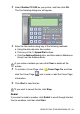
When you ar
e ready to send yo
ur fax, click the Send
icon.
7
If you wish to canc
el the fax, click the Cancel
icon.
You can also click
the
icon to create or ed
it a cover page.
1
...
...
214
215
216
217
218
...
...
290